Building a Document Chat App: How RAG Actually Works
Published At: July 5, 2026
Reading Time: 7 minutes
Author: Prajwol Shrestha
When I first came across RAG, the terminology made it sound more intimidating than it is - embeddings, vector search, cosine similarity.
But once you strip away the jargon, the core idea is straightforward. And building it yourself is genuinely the fastest way to understand it.
This post walks through how I built Khoj - a document chat app where you upload any PDF and ask it questions, with answers grounded in the document's actual content. I'll use it as a reference throughout, but the focus here is on how RAG works and why each piece exists.
The Problem RAG Solves
Large language models are trained on broad data, not your specific documents. When you ask an LLM about an internal report, a contract, or a policy document it has never seen, it will often produce a confident but fabricated answer — filling gaps with plausible-sounding information it doesn't actually know.
RAG addresses this by separating two concerns: retrieval and generation.
Instead of asking the model to recall information it may not have, you first retrieve the relevant parts of your document, then hand those to the model as context. The instruction becomes: "answer based only on this." The model stops guessing and starts reasoning over real information.
That is the entire idea. Everything else in this post is implementation.
Two Phases
A RAG system has two distinct phases that are worth keeping separate in your mental model.
Ingestion runs once when a document is uploaded. It prepares the document for search.
Query runs on every user question. It retrieves relevant content and generates an answer.
Phase 1 — Ingestion
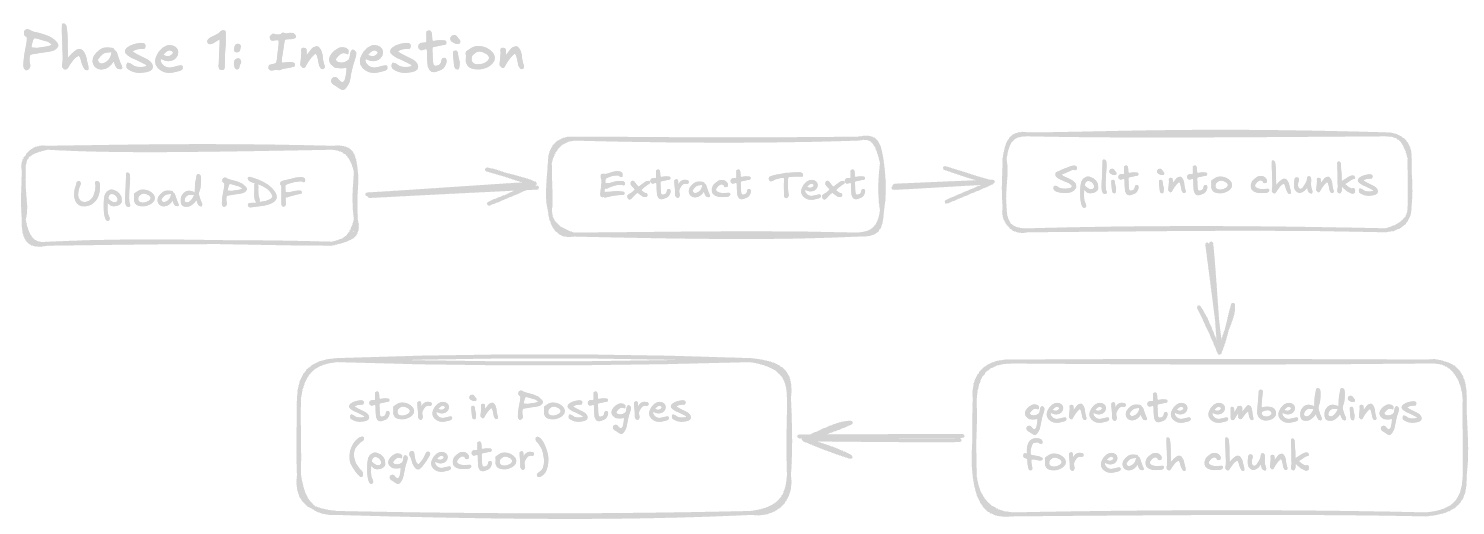
Why Chunking?
You cannot embed an entire document as a single vector. At that scale, the embedding captures only a vague, high-level representation - searching against it returns imprecise results.
Instead, the document is sliced into smaller pieces of around 500 characters each. Every chunk gets its own embedding vector, stored as its own row in the database. When a question arrives, the system finds the three most relevant chunks — not the whole document, just the pieces that matter.
The overlap between chunks (50 characters in this case) is important. Without it, a sentence that lands at a chunk boundary gets split in half and loses its meaning. Overlap ensures that the next chunk starts just before the previous one ended, preserving that context.
1export function chunkText(text: string, chunkSize = 500, overlap = 50): string[] {
2 const chunks: string[] = []
3 let start = 0
4
5 const cleaned = text
6 .replace(/\u0000/g, '') // null bytes cause Postgres errors
7 .replace(/[\u0001-\u001F\u007F]/g, '') // strip control characters
8 .replace(/\s+/g, ' ')
9 .trim()
10
11 while (start < cleaned.length) {
12 const end = start + chunkSize
13 chunks.push(cleaned.slice(start, end))
14 start = end - overlap
15 }
16
17 return chunks.filter(c => c.trim().length > 20)
18}What Is an Embedding?
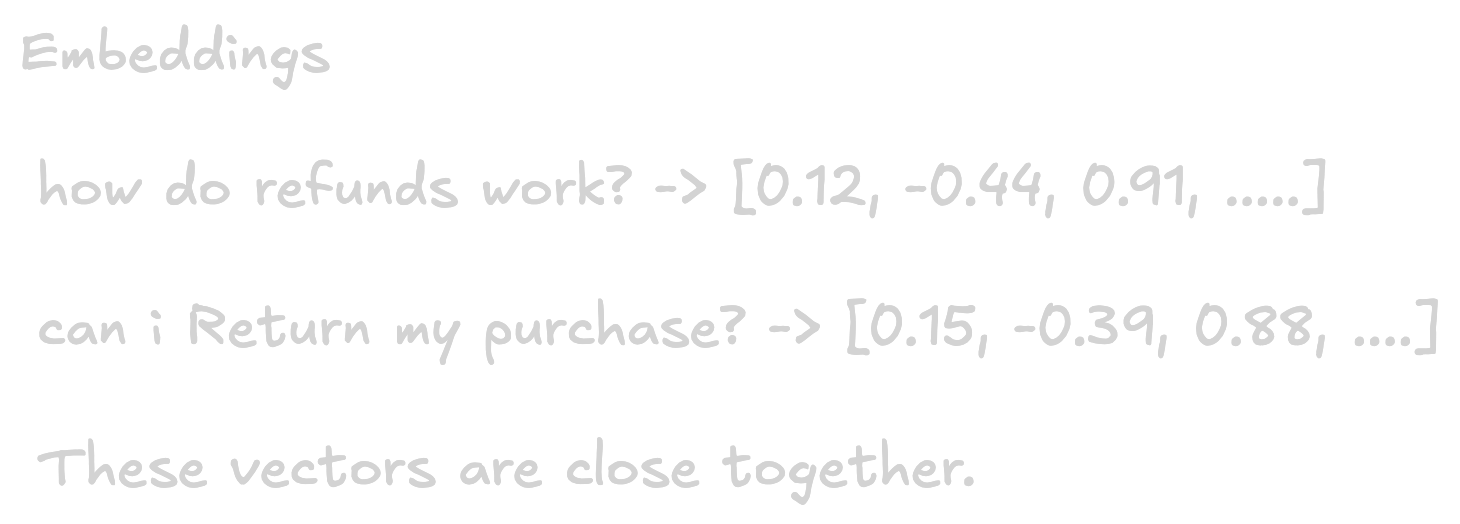
An embedding is a list of numbers that represents the meaning of a piece of text. Text with similar meanings produces vectors that are numerically close to each other in space.
This is what makes semantic search possible. You are not searching for exact keyword matches — you are finding chunks that are about the same thing as the question, even if they use entirely different words.
1// for document chunks
2export async function embedText(text: string): Promise<number[]> {
3 const result = await ai.models.embedContent({
4 model: 'gemini-embedding-001',
5 contents: text,
6 config: {
7 outputDimensionality: 768,
8 taskType: 'RETRIEVAL_DOCUMENT', // optimised for being retrieved
9 },
10 })
11 return result.embeddings?.[0]?.values ?? []
12}
13
14// for user questions
15export async function embedQuery(text: string): Promise<number[]> {
16 const result = await ai.models.embedContent({
17 model: 'gemini-embedding-001',
18 contents: text,
19 config: {
20 outputDimensionality: 768,
21 taskType: 'RETRIEVAL_QUERY', // optimised for retrieval search
22 },
23 })
24 return result.embeddings?.[0]?.values ?? []
25}The taskType distinction is worth paying attention to. RETRIEVAL_DOCUMENT and RETRIEVAL_QUERY instruct the model to optimise the output vector for different purposes — one for being found, the other for finding. Using the appropriate task type for each case measurably improves search quality with no additional cost.
Storing Vectors in Postgres
Each chunk is inserted into a Postgres table with a vector(768) column, powered by the pgvector extension:
1create extension if not exists vector;
2
3create table public.chunks (
4 id bigserial primary key,
5 document_id uuid references public.documents(id) on delete cascade,
6 content text not null,
7 chunk_index int not null,
8 embedding vector(768)
9);
10
11create index on public.chunks
12 using ivfflat (embedding vector_cosine_ops)
13 with (lists = 100);The ivfflat index makes similarity search fast. Without it, every query scans the entire table. With it, the search uses an approximate nearest-neighbor algorithm that is significantly faster at scale, with a negligible trade-off in precision.
Phase 2 — Query
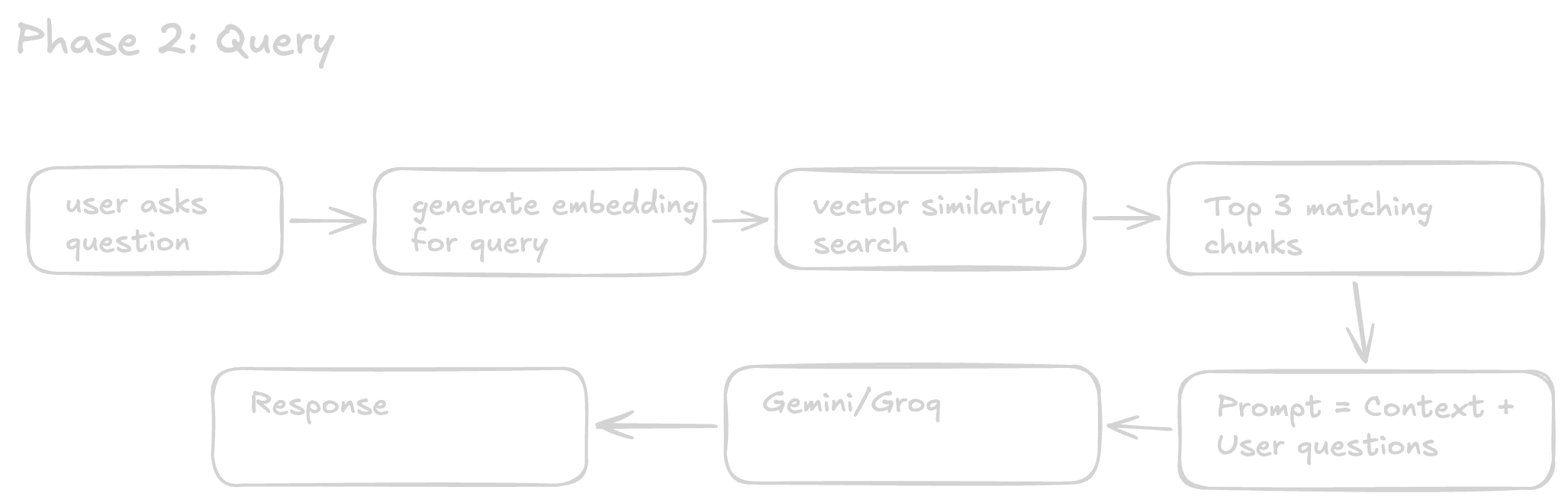
Embedding the Question
The user's question is embedded using the same model that was used for the document chunks. This is a requirement, Embeddings from different models exist in different vector spaces, so comparing them is like comparing GPS coordinates with Minecraft coordinates - they describe entirely different worlds.
Vector Search
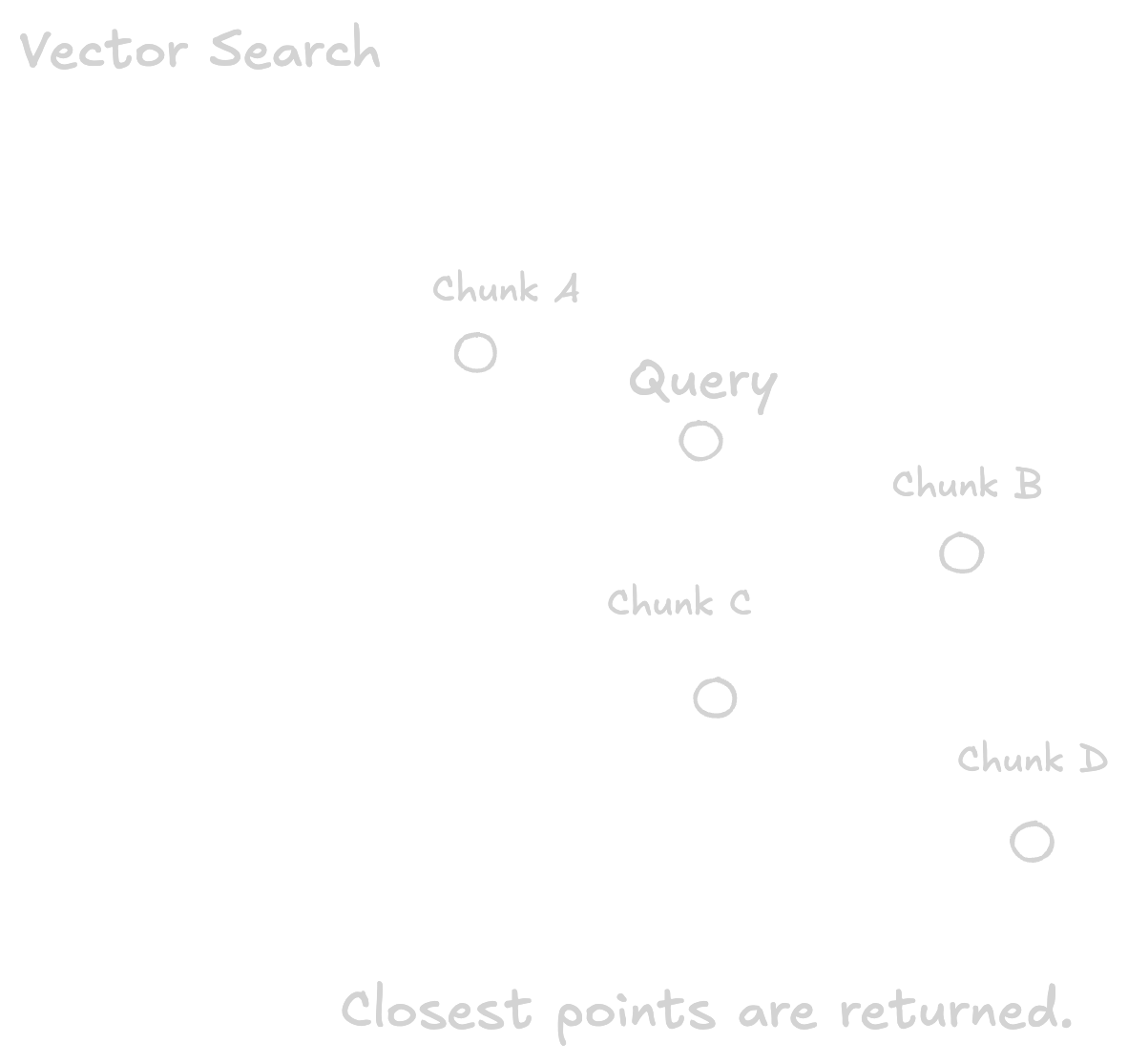
pgvector finds the chunks whose embeddings are closest to the question's embedding:
1create or replace function match_chunks(
2 query_embedding vector(768),
3 match_document_id uuid,
4 match_count int default 3
5)
6returns table (id bigint, content text, chunk_index int, similarity float)
7language sql stable
8as $$
9 select
10 id,
11 content,
12 chunk_index,
13 1 - (embedding <=> query_embedding) as similarity
14 from public.chunks
15 where document_id = match_document_id
16 order by embedding <=> query_embedding
17 limit match_count;
18$$;The <=> operator is pgvector's cosine distance. Since distance and similarity are inverses, 1 - distance gives you a similarity score between 0.0 (completely unrelated) and 1.0 (identical meaning).
Imagine every sentence as a point floating in a huge 768-dimensional space. Similar ideas naturally end up close together, while unrelated topics drift farther apart. Vector search simply asks, "Which stored points are nearest to this new point?"
The Similarity Threshold
pgvector always returns results — even when the question has nothing to do with the document. It simply returns the least-distant chunks it can find. Without a threshold, you will attach irrelevant "sources" to answers like "I couldn't find that information," which is misleading and confusing for users.
1const SIMILARITY_THRESHOLD = 0.5
2const relevantChunks = chunks.filter(c => c.similarity >= SIMILARITY_THRESHOLD)
3
4if (relevantChunks.length === 0) {
5 return "I couldn't find that information in the document."
6}A threshold of 0.5 is a reasonable starting point. You may need to tune it based on your specific content and embedding model.
Building the Prompt
The retrieved chunks are assembled into context and passed to the language model:
1const context = relevantChunks
2 .map((c, i) => `[Chunk ${i + 1}]:\n${c.content}`)
3 .join('\n\n')
4
5const prompt = `Answer based strictly on the context provided below.
6If the answer is not present in the context, respond with "I couldn't find that information in the document."
7
8Context:
9${context}
10
11Question: ${question}
12
13Answer:`The explicit instruction to answer only from the provided context is what prevents hallucination. The model is no longer filling gaps from its training data — it is reading and reasoning over the content you have given it.
Streaming Responses
Without streaming, the user submits a question and waits several seconds for the full response to appear at once. With streaming, words appear as they are generated. The total response time is the same, but the experience is fundamentally different.
The approach here uses Server-Sent Events (SSE). The server sends a stream of newline-delimited JSON events:
1data: {"type":"sources","sources":[...]}
2
3data: {"type":"token","token":"The"}
4
5data: {"type":"token","token":" document"}
6
7data: {"type":"done"}There are three event types: sources arrives first so the UI can display references immediately, token carries each word as it is generated, and done signals the end of the stream.
1// server — create the stream
2const stream = new ReadableStream({
3 async start(controller) {
4 const encoder = new TextEncoder()
5
6 // send sources before any tokens arrive
7 controller.enqueue(
8 encoder.encode(`data: ${JSON.stringify({ type: 'sources', sources })}\n\n`)
9 )
10
11 const completion = await groq.chat.completions.create({
12 model: 'llama-3.1-8b-instant',
13 messages: [{ role: 'user', content: prompt }],
14 stream: true,
15 })
16
17 let fullAnswer = ''
18 for await (const chunk of completion) {
19 const token = chunk.choices[0]?.delta?.content ?? ''
20 if (token) {
21 fullAnswer += token
22 controller.enqueue(
23 encoder.encode(`data: ${JSON.stringify({ type: 'token', token })}\n\n`)
24 )
25 }
26 }
27
28 controller.enqueue(encoder.encode(`data: ${JSON.stringify({ type: 'done' })}\n\n`))
29 controller.close()
30 },
31})
32
33return new Response(stream, {
34 headers: { 'Content-Type': 'text/event-stream', 'Cache-Control': 'no-cache' },
35})1// client — read the stream
2const reader = res.body!.getReader()
3const decoder = new TextDecoder()
4let buffer = ''
5
6while (true) {
7 const { done, value } = await reader.read()
8 if (done) break
9
10 buffer += decoder.decode(value, { stream: true })
11 const lines = buffer.split('\n\n')
12 buffer = lines.pop() ?? ''
13
14 for (const line of lines) {
15 if (!line.startsWith('data: ')) continue
16 const event = JSON.parse(line.slice(6))
17
18 if (event.type === 'token') {
19 setMessages(m => m.map(msg =>
20 msg.id === pendingId
21 ? { ...msg, content: msg.content + event.token }
22 : msg
23 ))
24 }
25 }
26}reader.read() is part of the browser's native Web Streams API and returns { done, value } on each call. No additional library is required.
Closing Thoughts
RAG is not a new category of technology — it is a pattern. Retrieve relevant information, then generate a response grounded in that information. The sophistication lives in how well you handle each step: chunk size, overlap, embedding quality, similarity thresholds.
Get those right, and the language model handles the rest.
If you want to explore the full implementation, The source code for Khoj is available on GitHub. A live demo is running at khoj.shresthaprajwol.com.np.
#ai
#webdev
#rag
#programming